Showing posts with label Tutorials. Show all posts

Tutorials (Episode 6): Learn to Take Photos, Create Your Blog and Insert Gadgets and Buttons


!Hello guys! !Here Sn2ckerspup!
!In a new post today!
In which I bring to the blog a new episode of  "Tutorials". The first episode in this year 2020.Puffle Party 2016 Dubstep Puffle emoticon

This time it is a special episode for those who want to be bloggers or if you are already a blogger they are things that will probably help you improve your website. Here I leave you three easy tutorials to start with your CPRewritten blogs or any other game.  Fashion 2015 Emoticons Blue Heart

Let's start:


Tutorials (Episode 5) | Play Experimental Penguins (Offline Mode) and Penguin Chat 3 (Online Mode - Not Available) in 2020!

!Hello guys! !Here Sn2ckerspup!
!In a new post today!

In which I bring to the blog a new episode of  "Tutorials". The second episode in this year 2019.

This time it will be a fairly short and simple tutorial. It consists of how to play Penguin Chat 3 and Experimental Penguins currently.

Experimental Penguins is an old game of the year 2000, which is believed to have started Club Penguin. It was a multiplayer / chat game, similar to Club Penguin and Penguin Chat 3, and was made in the RocketSnail era. The experimental penguins were the original Penguin Chat.

Penguin Chat was an online MMORPG game created by RocketSnail Games. It was the successor of Experimental Penguins. Penguin Chat included lots of new features like emotes, chat balloons, depth sorting (you could walk behind an object), and the ability to throw snowballs. It also introduced the Penguin Band for the first time. It was created with Flash 5.

Let's start:


Tutorials (Episode 4) | Play Club Penguin: Elite Penguin Force and all DS games in your PC (DS Emulator)

!Hello guys! !Here Sn2ckerspup!
!In a new post today!

In which I bring to the blog a new episode of  "Tutorials". The first episode in this year 2019.

This time I teach you how to play DS games with an emulator on the PC, it is a very simple tutorial that consists of two parts and will serve you if you do not have DS yet or if you simply do not have money to buy games and want to download them completely free.

Before starting here the requirements that your PC must have in order for the emulator to work:


  • CPU: 2 GHz.
  • RAM: 1 GB.
  • HDD: 5 MB for program files + 8 to 512 MB for each file with .NDS extension.
  • SO: Windows XP, OSX 10.5.8, Linux that has Kernel 2.6.
  • Have WinRar downloaded. Link of the dowload here.
  • Name of the Emulator: DeSmuME.

Let's start:


Tutorials (Episode 3) - How to earn coins quickly | Top 5 ways

!Hello guys! !Here Sn2ckerspup!
!In a new post today!

In which I bring to the blog a new episode of  "Tutorials" after so much time.

This time it clarifies a normal doubt in the community and is how to earn coins for your account quickly. Well many of you may wonder what is the best way. So I will give you the best five ways to earn money quickly in the game.

Let's start:


1st way: Drilling in the mine


This is undoubtedly the best way to earn coins preferred by most. You just have to go to the "Cave Mine" and start drilling in the middle area of this cave to earn a lot of money quickly. You must always change the zone in which you drill every 10 seconds or when you stop earning coins. You gain approximately between 400 - 600 coins per minute depending on your speed.
Also you do not have to make much effort, you just have to have your mining helmet and ready.


2nd way: Cart Surfer


The Cart Surfer is one of the easiest and most basic games on the island. You can also earn coins easily in this game. That depends on how good you are in the mine.
I recommend you first try to win all the stamps of the game because if you do this you will double the coins you earn per game. Click here for the guide of the stamps of Cart Surfer. 


Anyway, if you do not have all of them you can still earn 200 - 400 coins per minute. If you have all the stamps and you are very good at the game you could win between 600 - 800 coins per minute.
You could also try the Hardcore mode to try to reach the leaderboard top 1 and win lots of coins. That to your decision.


3rd way: Agua Grabber - Soda Seas Level


It's a weird method you'll say. But the truth is that this is one of the games that can make us win a few coins easily. You just have to always play the level of the sweet sea and collect the 5 barrels that are in the level, leave the level and re-enter it to go back to collect 5 barrels and so on. Well, you earn about 250 coins per game with this method.


Also if you have all the stamps of this game. You win about 1000 coins for every two games in which you perform the method correctly!
If you do not have them all then I hope this helps you. Click here


4th way: Sweet Pizzatron 3000 


Pizzatron 3000 is perhaps one of the most fun games you can see on the island. Well you can also win many coins in the game. Just go to sweet mode (tap the lever on the Pizzatron 300 start screen) and then make 10 pizzas per game.
You will win at least 165 coins for each game.

That's a total of 1300 coins for every 10 games. Also if you have all the winning stamps at least 260 coins per game (More coins if you do not have errors) which would be a gain of 165/260 coins for every 3 minutes.
It is a profitable and good method if you think about it.


5th way: Astro Barrier 


The Astro Barrier is one of the most basic and retro video games on the island. Did you know that for every 10 levels you complete you earn 79 coins ?. The best way to do this is to play the first 10 levels, get out of the game and play another game again. So you will get at least 79 coins for every 2/3 minutes which indicates that you earn 4740 coins per hour. It's not the best way, that's why it's last in this top.


However if you already have all the stamps of the game you will win 158 coins for every 2 minutes, and that would be a total of 9480 coins per hour depending on how fast you are.If you do not have them all then I hope this helps you. Click here


Extra way: Book Codes

This is a quick way to earn coins that only applies to those who have not yet unlocked books. Well, there are currently 7 books that can be unlocked. That would be about 7,000 coins for your account quickly. To unlock the books, click here


I hope all these forms help you get many coins in the game. I really enjoy doing this post, and of course if you have doubts or your own methods to earn coins easily and quickly do not hesitate to comment on the publication.


!Comment, Share and Enjoy!


!See you in the next post!


#WaddleOn


Tutorials (Episode 2) - Obtain the fonts used in Club Penguin

Hello guys! Here Sn2ckerspup!

Today we are with a new episode of the "Tutorials".

This time I bring some fonts used in Club Penguin so that they can use them for the logo of your blog, buttons, signatures or animated penguins.

Let's take a look:


Part 1: Download Fonts

First of all here I leave a list with the links so that they can download the different sources: (Click on image descriptions. that lead to the download link)

You also need to have the program: Winrar, To be able to view the source folders.


A.C.M.E EXPLOSIVE: Source used in the APS manual.

ACTION MAN: Source of the "Play Now" button

CANDOMBE: Font of the card-jitsu logo.

CREAKY FRANK:  Font used for the Halloween party logo


FOONKY HEAVY: Source used for the puffles party logo

BURBANK BIG REGULAR: Source used a lot by bloggers to create buttons or banners


Part 2: Install the fonts on your computer


2015
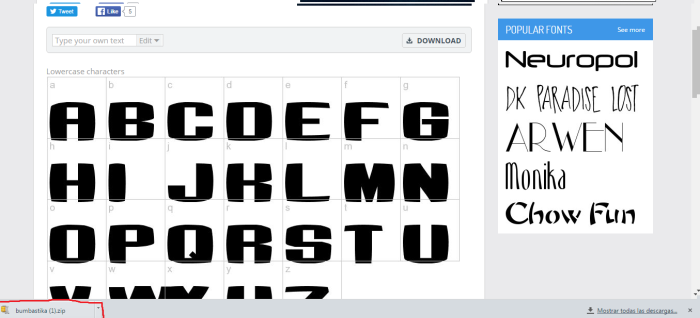
Step 1: When you are in the link, and download the source, If you have google chrome the file will be in a download bar, now double click on the file.


2017
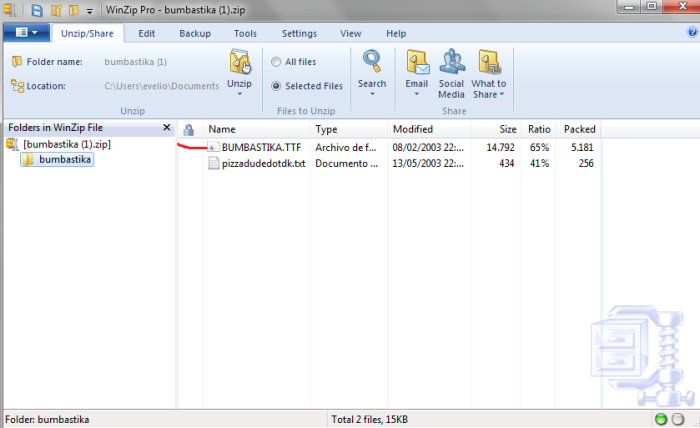
Step 2: Now we will be in the folder.


2018
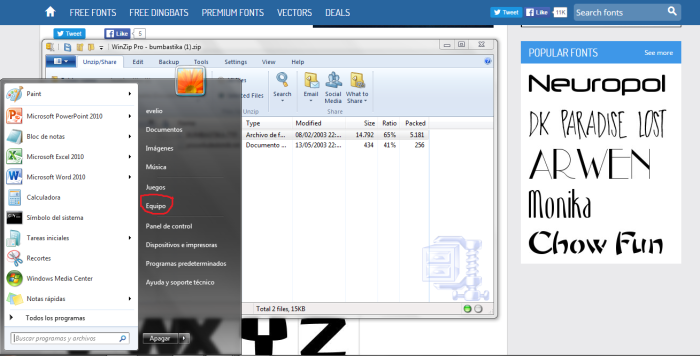
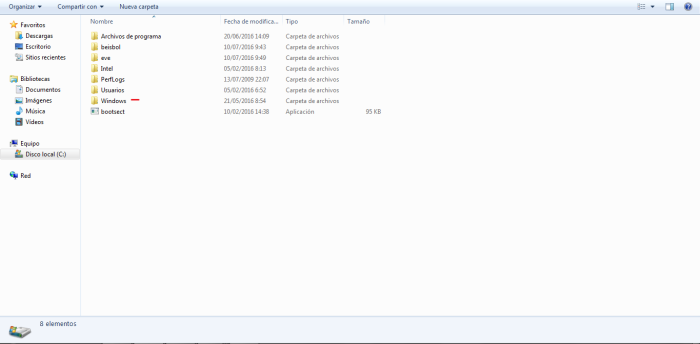
Step 3: Without closing the file, we click the start button and then click on "Computer/Equipment".


2019
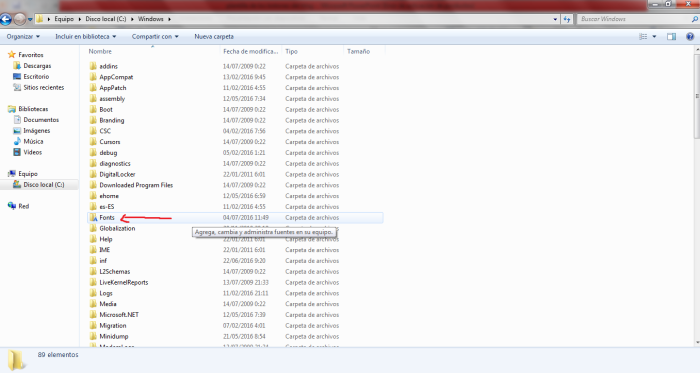
Step 4: ¡We click on "Local Disk C" and then we click the folder called "Windows" to guide you through the image!


2020
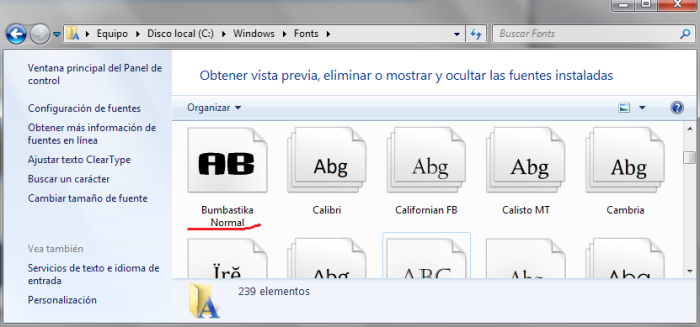
Step 5: We look for and click on the folder called "Fonts" (¡Use the image as a reference!)


2021
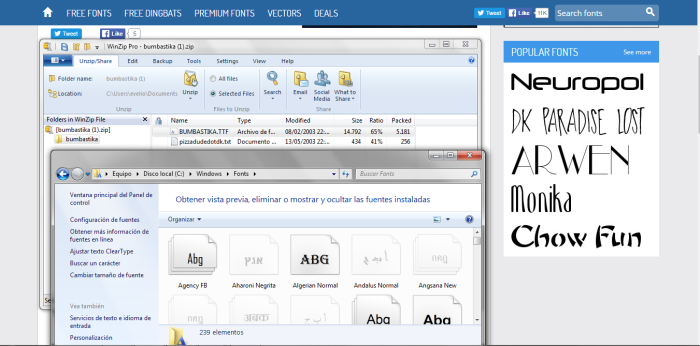
Step 6: Well, now minimize the tab where we are so it looks like this.


2022
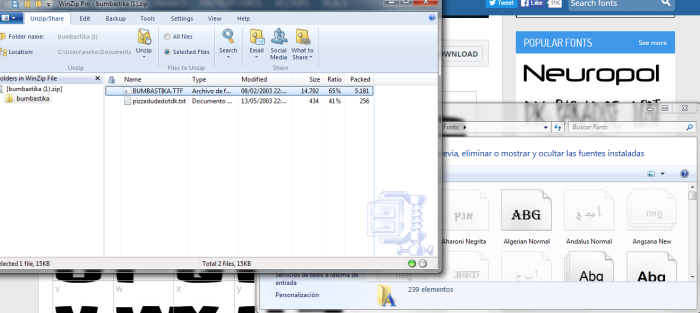
Step 7: Now place the two tabs in this way, and click and hold the left mouse button to move the file to the other tab.


2023
Step 8: Ready! We already have our source, now we can use it in paint, photoshop and other programs!


I hope this guide has helped you, if you missed a step, do not hesitate to share it with a comment!

¡Comment, Share and Enjoy!

¡See you in the next post!

#WaddleOn


Tutorials (Episode 1) - Find the characters easily

Hello guys! Here Sn2ckerspup!

Today I decided to make a new series on the blog that I hope many of you like, which is simply about...


Exact! In this series, we dedicate to upload tutorials every year for all of you. ¿As? 

Well you can comment this post starting, to tell me which tutorial you want me to upload, Or myself can get an idea for the following tutorial!

This series is made in order to help all people. The tutorials will be step by step detailed so you do not miss any detail. They can be from guides to stamps to tutorials on how to make your animated penguin and that kind of thing!


Changing the subject...

But well, not to mention more, here we bring you the first episode, which is a specific topic that many people like, the characters!

And is that you know that CPR is more difficult the thing, since it is not as in Club Penguin that the team gave you the schedules and the characters were connected every day. What would you ask yourself, how can I find the characters fast if I do not know when they connect? Easy, let's take a look:


Step 1: Connect to: Discord


As you can see the link that has the word "Discord" is an invitation to the server of "Mascot Sightings", you ask, ¿What is this?. In summary is a chat where moderators will always be aware of the characters that connect 24 hours a day. Each character that connects is a new message in the chat, the mods will update the server and the room where the characters are present. You can follow the activity of these live!


Step 2: When you see that the character's server is full, nothing happens. Refresh the page and continue until you see that it is no longer full. Since hundreds of penguins connect and disconnect in seconds so you have to take advantage of this.
Remember not to surrender ;)


Part 2: When you are on the server where the character is


Tip 1: Do not do the same as everyone.

Well, as you know all the people to see a famous in a room seeks to enter it, but most of the time the room is very full, That when you try 10 times you do not enter, that's why it's best to come and look for the possible room in which the characters are going to enter!

Just remember that when a character connects this goes around the island, or just the special rooms of the party. When in discord chat say a room, try to enter that room, but if you do not enter, then enter a room that is next to that.

Believe me, it's the best, I lost 2 celebrities to be doing that, I tried 20 times and when I finally enter. The character had already gone to another room.

Also when you try to enter a full room and an orange message appears, the screen will freeze. I mean you can not see what he says or what people do. You can only move.


Part 3: When the character is in the same room as you


You will know that the typical thing is that an infinity of people stick to the character and not let you even see it. And you in case you want to get your background, well, here is the solution to this problem!

Step 1: Enter in your friends list, and then click on the next option!


Step 2: From here you will see all the penguins connected in the room, problem solved!


Step 3: Besides that, the famous characters are identified with a special emoticon so that they can distinguish of all the penguins, in that list!


And ready! Now you can start your search by following each of these tips! ;)

I hope this helps them a lot in the future, ¿What do they think of the guide?

Remember to comment that guide you want to publish next week, the most commented will be the winner, these guides are for many people in the community, This has been the end of the first episode!

Comment, Share and Enjoy!

See you in the next post!

#WaddleOn


Popular post

Current Party (Maximum Guide)

Subscribe!

Follow me!

Follow us!

Current Field Op Guide

Translate the blog to your language

Super Club Penguin Guides Spanish Section

Super Club Penguin Guides Spanish Section

Play CPRewritten

The current

The current

Introduction Guides

Introduction Guides

All Sections

All Sections

Help Section

Help Section

Guides to become a Ninja, Tour Guide and Agent

Guides to become a Ninja, Tour Guide and Agent

Guide for the PSA Missions

Guide for the PSA Missions

Stamp Guide

Stamp Guide

Games Guide

Games Guide

Unlock Books and Earn Coins

Unlock Books and Earn Coins

Our Blog Community

Our Blog Community

Club Penguin Legacy Section

Club Penguin Legacy Section

All Parties and Events in the History of Club Penguin

All Parties and Events in the History of Club Penguin

Characters

Characters

Club Penguin Rooms

Club Penguin Rooms

All Catalogs in the History of Club Penguin

All Catalogs in the History of Club Penguin

All Postcards in the History Of Club Penguin

All Postcards in the History Of Club Penguin

All Inventions in the History Of Club Penguin

All Inventions in the History Of Club Penguin

Club Penguin Series

Club Penguin Series

The Music Zone

The Music Zone

All Yearbooks in the History Of Club Penguin

All Yearbooks in the History Of Club Penguin

All Treasure Books in the History Of Club Penguin

All Treasure Books in the History Of Club Penguin

Read Your Favorite Club Penguin Books in Our Library

Read Your Favorite Club Penguin Books in Our Library

Learn NEW Things

Learn NEW Things

Museum of Penguin Of The Week at Club Penguin Rewritten

Museum of Penguin Of The Week at Club Penguin Rewritten

Find Characters

Find Characters

Our Blog Anniversarys

Our Blog Anniversarys

Archive


Add our banners to your blog!


Thank you very much for your visit!

Advertising


CPR Cheats is not a website associated with CPRewritten, we are a blog fan of the game. Ready to give you the best posible content.
CPR Cheats © by Sn2ckerspup | All rights reserved | Theme by Labur0